How to Track SLA Obligations Across Multiple Clients (Without Losing Your Mind)
By ClientCommit Team
Your contracts promise more than response times. Here's how to make sure you actually deliver on all of it.
Every MSP has a version of this story.
A client calls, frustrated. Not about a slow ticket response. About the quarterly business review that never happened. Or the compliance report that was due last Friday. Or the renewal conversation that should have started two months ago.
You check the contract. They're right. It's in writing. You just... forgot.
In most MSPs, the contract gets signed, saved somewhere, and then mostly forgotten. The problem isn't that people don't care. It's that the work promised in the contract never gets turned into something the team actually sees and owns week to week.
You're not alone. According to World Commerce & Contracting, companies lose an average of 9.2% of annual revenue to ineffective contract management. For a $2M MSP, that's roughly $184,000 leaking out every year. Not from bad work, but from obligations nobody remembered to fulfill.
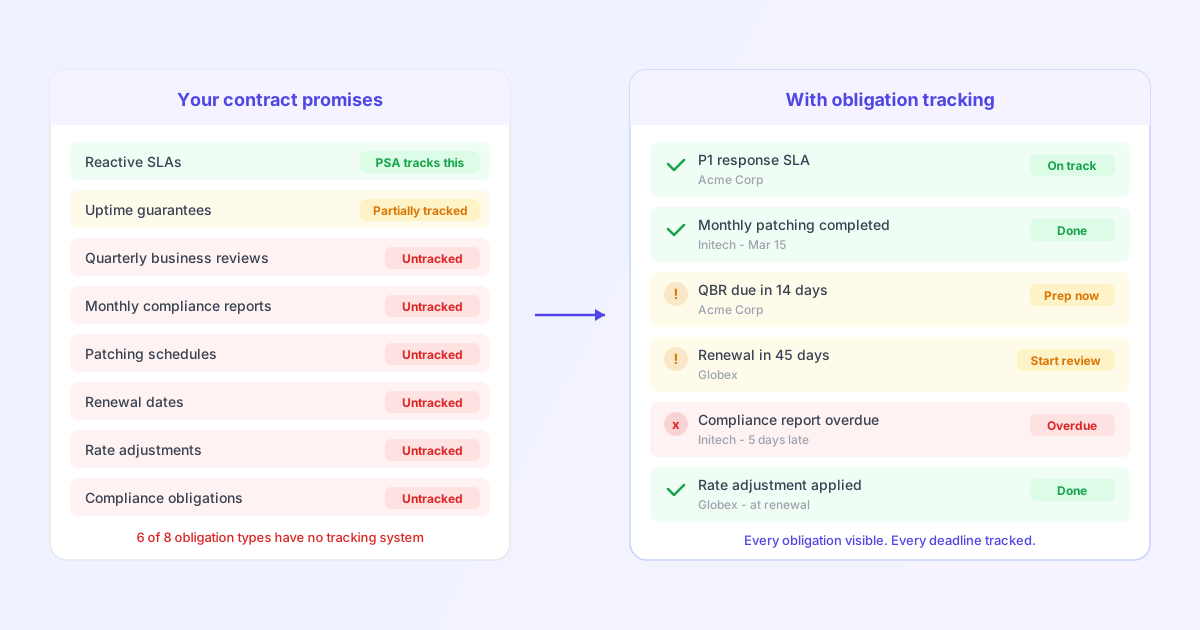
And nobody talks about this part: your PSA tracks what comes in, not what you promised to do. And most of what you promised never becomes a ticket. The QBRs. The deliverable schedules. The renewal windows. The compliance obligations buried on page 14 of the SOW.
This post gives you a practical framework to fix that. To track every obligation you've committed to, across every client, before something falls through the cracks.
What is SLA obligation tracking? SLA obligation tracking is the process of monitoring all commitments in a client contract (response times, deliverables, reporting cadences, compliance requirements, and renewal terms) to ensure nothing is missed.
What you're actually supposed to be tracking
Most MSPs equate "SLA tracking" with response and resolution times. That's one layer. A typical managed services contract contains five distinct categories of obligations, and your PSA probably only covers the first.
Think of your contract as a to-do list with deadlines, just written in legal language. Here's what's actually on that list:
1. Reactive SLAs
These are the ones you know. Response times and resolution targets, tiered by severity:
- Critical (full service outage): 15-30 minute response, 4-hour resolution target
- High (service degradation): 1-2 hour response, 8-hour resolution target
- Medium (individual impact): 4-8 hour response, 24-hour resolution target
- Low (minor issue): 24-48 hour response, 5-business-day resolution target
Your ConnectWise, Autotask, or HaloPSA handles this well. Timers run, escalations fire, dashboards light up. This part of SLA tracking is a solved problem.
2. Availability Commitments
Uptime guarantees (99.9%, 99.95%, 99.999%) with specific measurement windows, exclusions, and maintenance schedules. These often come with financial penalties: service credits of 5% per hour of excess downtime are standard in many MSP contracts.
3. Recurring Deliverables
This is where the ball gets dropped for most teams:
- Weekly or monthly patching cycles with client-specific schedules
- Quarterly Business Reviews: a 60-90 minute meeting presenting ticket volumes, resolution metrics, and strategic recommendations
- Monthly SLA compliance reports sent to the client
- Backup verification and disaster recovery test schedules
- Security awareness training delivery cadences
4. Compliance Obligations
If your client operates in a regulated industry, your contract likely includes commitments around maintaining HIPAA, SOC 2, PCI DSS, or GDPR compliance. Not just for them, but for your own handling of their data. These have hard deadlines and audit-trail requirements.
5. Commercial Terms
The business obligations that directly impact revenue:
- Contract renewal dates and auto-renewal windows
- Rate adjustment periods (often 30-90 days before renewal)
- Invoicing schedules and payment terms
- Termination notice periods
- Technology refresh or hardware replacement commitments
The hard part is that categories 3 through 5 live in the contract, not in your PSA. Usually the ticketing side is tight. It's the "non-ticket work" that drifts: reports, review meetings, backup checks, renewal prep, notice periods.
| Obligation Type | Example | Tracked in PSA? | Where It Actually Lives |
|---|---|---|---|
| Reactive SLA | 30-min response for P1 tickets | Yes | Ticket system timers |
| Availability | 99.95% uptime guarantee | Partially | Monitoring tools |
| Recurring deliverable | Monthly patching on the 15th | No | Someone's memory |
| Compliance | Annual HIPAA risk assessment | No | Page 14 of the contract |
| Commercial | Renewal date, rate adjustment window | No | A spreadsheet, maybe |
Why it falls apart at 10+ clients
At five clients, the founder remembers everything. Each contract is personal. You know that Client A wants patching on Tuesdays, Client B needs a QBR every January, and Client C has a renewal coming up in March.
At ten to fifteen clients, cracks appear. You build a spreadsheet. Most obligations get tracked. Some don't. But clients don't notice yet, or they're too polite to say anything.
At twenty-plus clients, each with unique contract terms, it becomes unmanageable. Client A has monthly patching on the 15th. Client B wants it on the 1st. Client C switched to biweekly six months ago but paused it last quarter. Did anyone remember that Client C restarted it in January?
We've talked to MSP owners managing 30+ clients who still tracked renewals in a Google Sheet called "IMPORTANT DATES FINAL FINAL.xlsx." Not because they're careless. Because nothing better fit how they actually work.
The numbers confirm what most operators already feel: 71% of companies can't even locate 10% or more of their contracts (Journal of Contract Management), and 90% of contract professionals struggle to find specific terms within their own agreements (ContractPodAI).
This usually isn't a competence issue.
It's a systems issue.
Once you have enough clients, too many promises live in too many places. I've seen renewals tracked in a spreadsheet, QBRs tracked in a calendar, and compliance items buried in an onboarding doc nobody opened after kickoff. Each person has their own system, and none of them talk to each other.
The real cost of missing obligations
Most SLA breaches don't happen on tickets. They happen everywhere else.
When people think about SLA failures, they think about penalty clauses. But the real cost is wider than that.
Direct financial penalties
Many MSP contracts include structured penalties for non-compliance: service credits (typically 5-10% of monthly fees per incident), fee reductions for sustained underperformance, or clawback provisions for undelivered services. After three consecutive SLA violations, most well-drafted contracts grant the client termination-for-cause rights.
Missed commercial windows
A renewal date that passes without a conversation means another year locked into terms you wanted to renegotiate. A rate adjustment window you missed means absorbing cost increases for 12 more months. An auto-renewal clause nobody flagged means a client who wanted to downgrade is now stuck. And resentful.
Research shows it takes an average of 97 days to renegotiate a contract, roughly three times longer than the original approval. Start late, and you're already behind.
Silent churn
This is the most expensive failure, and the hardest to measure. The client doesn't invoke a penalty clause. They don't complain about a missed QBR. They just don't renew.
One MSP we spoke to missed three QBRs in a row for their second-largest client. Not because they didn't care, but because nobody owned it. The client left at renewal. No warning. No negotiation.
You never connect their departure to the quarterly review that didn't happen, or the compliance report that arrived two weeks late, or the sense that your team wasn't on top of things. But they do.
It's rarely one big failure. It's the accumulation of small misses over months that quietly degrades trust until the client decides they'd be better off elsewhere.
A practical framework for tracking everything
Here's a five-step system for turning contracts into work your team actually executes. You can start this week.
Step 1: Extract
Pick your top ten clients by revenue. Pull every active contract: MSA, SOW, addenda, amendments, side letters. Read them with one question: "What did we promise to do, and by when?"
Don't just read the SLA page. Check the scope of work for deliverable commitments. Check payment terms for invoicing obligations. Check the signature page for renewal and termination dates.
For each obligation you find, capture:
- What is the obligation?
- Who is it for?
- How often does it recur?
- What's the deadline or trigger?
- What happens if we miss it?
This step is tedious. Genuinely painful, actually. I remember sitting at my desk one evening going through a client's 40-page MSA, highlighting obligations in yellow, and slowly realizing we'd been missing a monthly compliance report for five months straight. That sinking feeling is what made me take this seriously.
When we started digging into this across more clients, we noticed something consistent: teams were excellent at tracking tickets and completely blind to everything else. Most discover at least three to five obligations per client that nobody was actively tracking.
Simple rule of thumb: if an obligation isn't written down somewhere your team sees weekly, it doesn't exist.
Step 2: Categorize
Sort every obligation into the five types: reactive SLAs, availability commitments, recurring deliverables, compliance obligations, and commercial terms.
Once you see it laid out, the gaps are usually obvious. The ticket stuff? Handled. The rest? Scattered or missing entirely.
Step 3: Assign Ownership
Every obligation gets exactly one person responsible. Not a team, not "everyone." One name next to each line item.
40% of organizations lack clear ownership over contract responsibilities. You've probably seen this play out: a QBR gets missed, and three people all assumed someone else was handling it. If an obligation doesn't have a clear owner, it will be missed. Every single time.
Step 4: Set Trigger Dates
Don't just track due dates. Set alerts before the deadline, with enough lead time to actually act:
- QBR due in 30 days -> Alert at day 14 to start preparing
- Contract renewal in 90 days -> Alert at day 90 to begin the conversation
- Monthly compliance report -> Alert 5 business days before it's due
- Rate adjustment window opens -> Alert 2 weeks before to review pricing
The alert should be early enough that it's useful, not so early that it gets ignored.
Step 5: Establish a Review Cadence
- Weekly (15 minutes): Scan upcoming obligations across all clients for the next two weeks. Flag anything at risk.
- Monthly (30 minutes): Audit compliance rates. Which obligations were met? Which were late? Which were missed entirely?
- Quarterly (60 minutes): Review all contracts approaching renewal. Assess whether SLA targets still match operational capacity. Update obligation records for any contract changes.
The minimum viable version
If you're starting from zero, here's the simplest version that works: a shared spreadsheet with six columns.
| Client | Obligation | Owner | Frequency | Next Due Date | Alert Date |
|---|---|---|---|---|---|
| Acme Corp | QBR | Sarah | Quarterly | 2026-04-15 | 2026-04-01 |
| Initech | Monthly patch report | James | Monthly | 2026-04-05 | 2026-03-31 |
| Globex | Contract renewal | Maria | Annual | 2026-06-30 | 2026-04-01 |
It's not ideal. There's no automation, no audit trail, and it breaks when someone forgets to update a row. But it's infinitely better than obligations living in someone's head.
Tools that help (and where they fall short)
Let's run through what's out there:
PSA platforms (ConnectWise, Autotask, HaloPSA): Excellent for ticket-level SLA tracking. Timers, escalations, and dashboards work well. But they're built around tickets, not contracts. Recurring deliverables, renewal dates, compliance obligations, and commercial terms live outside what a PSA is designed to manage.
Spreadsheets: Flexible and free. No learning curve. But no automated alerts, no audit trail, no accountability. They work fine until they don't, and they tend to fall apart right when you need them most (when you're growing fast and juggling more clients).
Enterprise CLM platforms (Ironclad, Juro, Aavenir): Purpose-built for contract lifecycle management, but designed for legal and procurement teams at large enterprises. They solve a different problem for a different audience. A 25-person MSP doesn't need a $50K/year CLM platform.
Calendar and task tools: Better than nothing, but contract obligations get buried alongside every other task and meeting. There's no structured view of "what do we owe every client this month?"
What's missing is something that sits between the contract and the team's actual workflow. PSAs handle the ticket side. CLMs serve legal departments. But for the operations person who needs to know "what do we owe every client this month," there isn't much out there.
We built ClientCommit for this exact gap. You upload the contract, it pulls out the obligations people usually miss, and it gives your team one place to track what's due and who owns it. That includes QBRs, reports, renewals, compliance deadlines, and billing milestones, not just response-time SLAs. Your data stays private (AES-256 encryption, anonymized before any AI processing).
Not every contract is equally messy, and not every MSP needs a dedicated system on day one. If you're handling five straightforward agreements, a spreadsheet may genuinely be enough. But once the client count rises and each one has slightly different terms, the manual approach starts costing you. We're onboarding founding customers now with hands-on setup and lifetime pricing if you want to give it a look.
The real differentiator
I don't think this is really a tooling problem. It's a visibility problem. You can't deliver on something you're not even looking at.
The MSPs I've seen retain clients for five, seven, ten years don't necessarily have the fastest response times. What they do have is a system where the QBR is always prepped, the renewal conversation starts well before the deadline, and the compliance report shows up before the client has to ask. That stuff matters more than most people realize.
It doesn't come from working harder. It comes from knowing what you owe, to whom, and by when. For every client, not just the ones that are top of mind this week.
If you take one thing from this post, make it this: pick your top five clients this week. Pull their contracts. List every obligation you can find, from response times to deliverable schedules to renewal dates.
I'd bet you find at least one thing nobody on your team is actively tracking. Probably more than one.
Better to find it yourself than wait for the client to notice.